For Schools

Spell & Grow for Schools

Set spelling homework in under 3 minutes. Share a join code with parents. Track progress with a simple traffic-light dashboard. No child accounts, no fuss.

30-day free trial · No payment details required

Built-in words
3,050+
Difficulty tiers
6
To set a list
<3 min
Pupil reports
5-page

How it works

Three simple steps from setup to spelling practice.

1

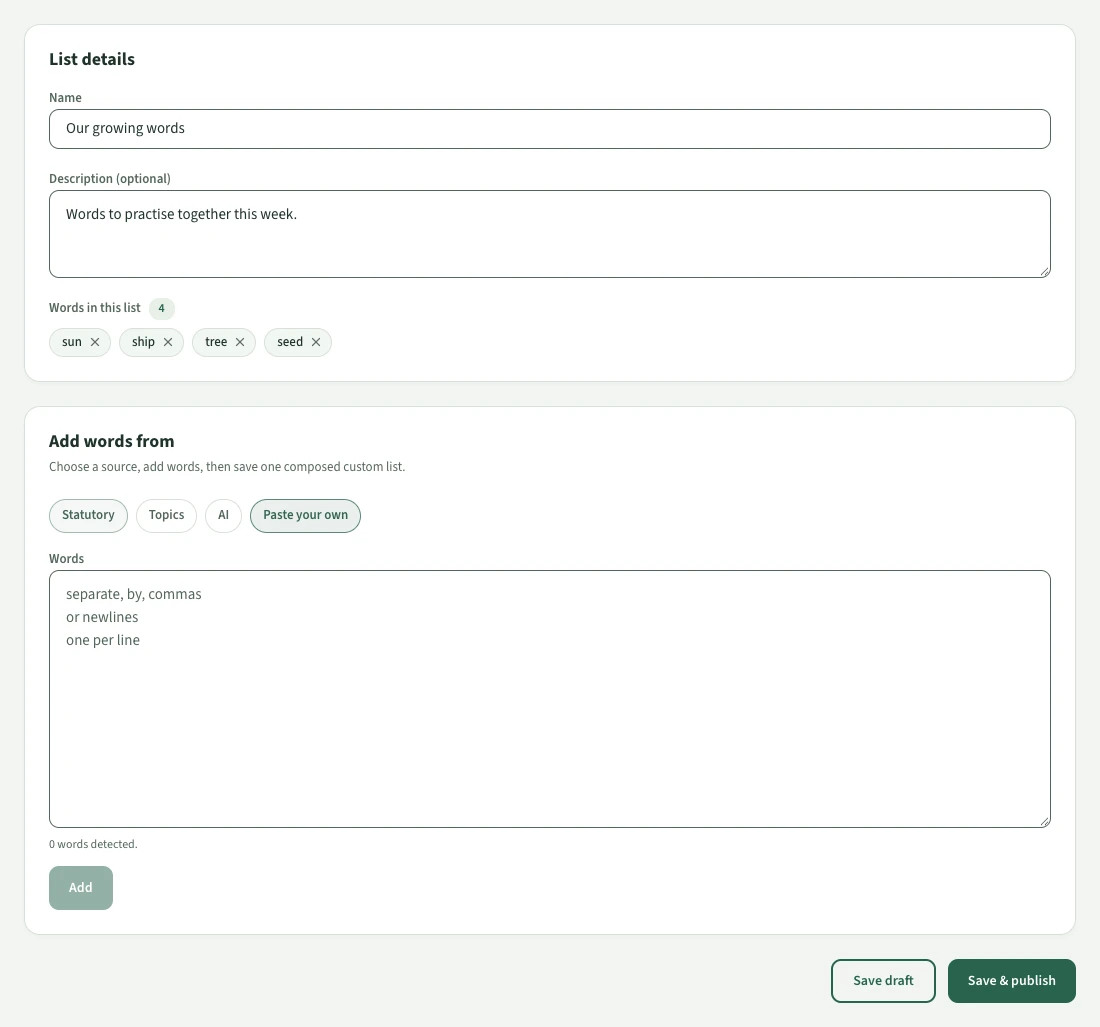
Create a word list

Browse our bank of 3,250 curriculum-aligned words or type your own. Sentences and audio are generated automatically.

2

Share the join code

Each class gets a unique 6-character code. Send it home in a letter or display it in the classroom. Parents enter it in the app.

3

Track progress at a glance

See which pupils have practised, who is struggling, and which words need re-teaching — all in a simple traffic-light dashboard.

Features for teachers

Everything you need to set, manage, and track spelling across your school.

Create lists from 3,250-word bank

Search and select from our curated, curriculum-aligned word bank. No need to type every word from scratch.

AI word list generator

Describe a topic and let AI build a curriculum-aligned word list for you — complete with sentences and audio, ready in seconds.

Auto-generated sentences & audio

Every word gets a clear British English audio recording and a context sentence, generated automatically when you publish.

Traffic-light progress view

Green (completed, ≥70% accuracy), amber (started or <70%), red (not started). One glance tells you everything.

Sign in with Google or Microsoft

Teachers can sign in instantly using their school Google Workspace or Microsoft 365 account. No separate passwords to remember.

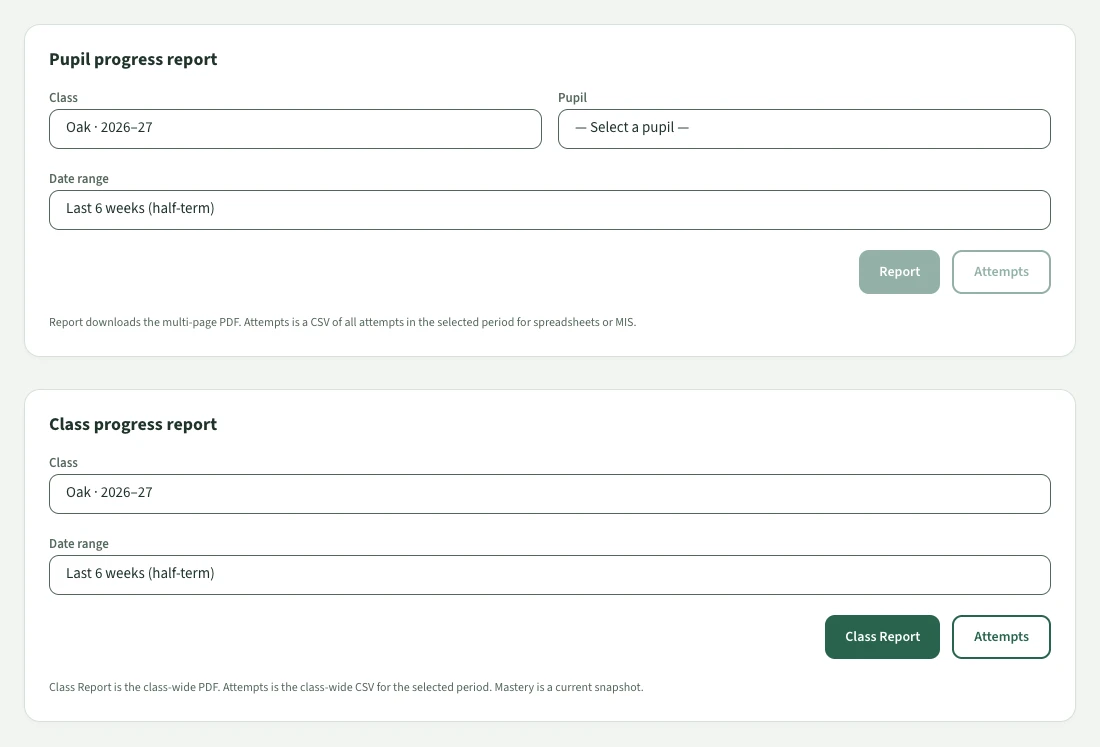
CSV & PDF export

Export progress reports for records, parents’ evenings, or Ofsted evidence. Per-pupil and per-class views available.

Class management

Create classes, generate join codes, view which pupils have linked, and manage your roster — all from one dashboard.

Teacher invitations

Invite colleagues to your school account. School admins manage all classes; teachers manage their own.

Comprehensive pupil reports

Generate multi-page PDF progress reports with accuracy trends, error pattern analysis, and personalised recommendations for teachers and parents.

Class leaderboards & certificates

Motivate pupils with opt-in weekly leaderboards and teacher-issued certificates — Speller of the Week, list completion, and custom awards.

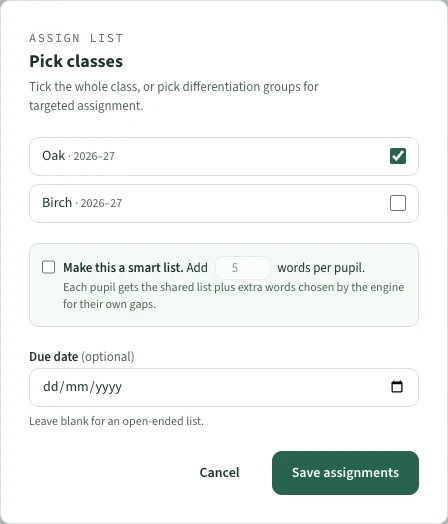
Differentiation groups

Create ability groups within a class and assign different word lists to each group. Pupils see only their lists — no labelling.

Google Classroom integration

Import pupils from Google Classroom, sync assignments, and push grades back — all from the portal settings.

SEND-friendly & accessible

Reading Comfort mode, adaptive difficulty, WCAG AA contrast, screen reader support, and no time pressure. Designed for every learner.

MAT & trust portal

Multi-school management for Multi-Academy Trusts — trust-level word lists, cross-school reporting, and centralised administration.

iPad & tablet landscape support

Works beautifully on classroom iPads and tablets in both portrait and landscape orientations, with responsive layouts for every screen size.

Certificate automation

Set rules that automatically issue certificates — perfect score, list complete, speller of the week, or most improved. No manual work needed.

Spelling Insights & word enrichment

AI-powered analysis shows each pupil’s spelling challenge patterns — vowel confusion, double letters, silent letters — with actionable teaching recommendations.

Independent assessment mode

Solo Spell removes all hints and scaffolding so teachers see true independent spelling ability. Replace your Friday paper test.

Configurable mastery policy

Set school-wide or per-class mastery thresholds, attempt counts, and scoring weights. Classes inherit from school defaults with optional overrides.

Web access for pupils

Pupils can practise on school Chromebooks, laptops, or any web browser at learn.spellandgrow.app — no app install needed.

Simple, transparent pricing

Simple per-pupil pricing. No hidden costs.

Most popular

State Sector

£200 minimum per school per year

50p/pupil/year
  • Unlimited word lists
  • AI word list generator
  • All 3,250 built-in words
  • Traffic-light dashboard
  • Spelling Insights & word enrichment
  • Comprehensive PDF reports
  • Independent assessment mode
  • Configurable mastery policy
  • Class leaderboards & certificates
  • Certificate automation rules
  • Google Classroom integration
  • Differentiation groups
  • Join code system
  • Google & Microsoft SSO
  • SEND accessibility features
  • Email support
Request Information

Independent Schools

Private and independent schools

£3/pupil/year
  • Unlimited word lists
  • AI word list generator
  • All 3,250 built-in words
  • Traffic-light dashboard
  • Spelling Insights & word enrichment
  • Comprehensive PDF reports
  • Independent assessment mode
  • Configurable mastery policy
  • Class leaderboards & certificates
  • Certificate automation rules
  • Google Classroom integration
  • Differentiation groups
  • Join code system
  • Google & Microsoft SSO
  • SEND accessibility features
  • Email support
Request Information

All prices exclude VAT. 30-day free trial available for all plans. Multi-Academy Trust pricing available on request.

Privacy & compliance

Built for schools from the ground up. No compromises on children's data protection.

COPPA & GDPR-K compliant

Designed from the ground up to meet children’s data protection regulations in the UK, EU, and US.

DPA available

A Data Processing Agreement is available for download and countersigning before onboarding.

No child accounts needed

Children never create accounts. Parents link profiles via a join code in the app’s Parent Area.

Data stored in UK/EEA

All school data is hosted on Supabase EU (AWS eu-west-2, London). No data leaves the UK/EEA.

Cyber Essentials certified

We hold Cyber Essentials certification, demonstrating our commitment to cybersecurity best practices.

Join code model

No child email addresses or passwords. A 6-character class code, entered by the parent, is all that’s needed.

Parent controls unlinking

Parents can unlink their child from a school class at any time from the app’s Parent Area.

Sub-processor transparency

A full register of all sub-processors, data categories, and transfer mechanisms is published and updated regularly.

Request information

Tell us about your school and we'll be in touch within one working day.

We'll respond within one working day. Your details are only used to follow up on this enquiry.

Frequently asked questions

Common questions from teachers, head teachers, and school business managers.

State sector schools pay 50p per pupil per year, with a minimum of £200 per school per year. Independent (private) schools pay £3 per pupil per year. For example, a 420-pupil state primary pays just £210/year. All plans include the same features.

You share your class’s 6-character join code with parents (via letter, newsletter, or classroom display). The parent downloads the free Spell & Grow app, opens the Parent Area, and enters the code. It takes under a minute. No child account is created.

Yes. Spell & Grow is fully UK GDPR and COPPA compliant. We process only the minimum data needed: the child’s first name (which can be a nickname) and their spelling progress. No surnames, no dates of birth, no email addresses. A Data Processing Agreement is available for download.

No. Children never create accounts or provide any personal information. The parent links the child’s profile to the school class using a join code — the child simply sees their school word lists appear in the app.

Spell & Grow runs on iPhones, iPads, Android phones and tablets, Chromebooks, and any web browser at learn.spellandgrow.app. It works beautifully in both portrait and landscape orientations. Most spelling practice happens at home. School-assigned word lists are included in the free app — parents do not need a paid subscription.

Yes. Teachers can sign in to the Schools Portal using their Google Workspace for Education or Microsoft 365 (Entra ID) account. This means no separate passwords to manage — just click ‘Sign in with Google’ or ‘Sign in with Microsoft’ on the login page.

Yes. Spell & Grow includes Reading Comfort mode (increased letter spacing and clearer fonts), adaptive difficulty that meets each child where they are, WCAG AA colour contrast, full screen reader support, no time pressure in standard mode, and positive-only feedback. We publish a detailed SEND accessibility statement for SENCOs and procurement officers.

No. School-assigned word lists are completely free for pupils. The app is free to download and school lists bypass all freemium gates. Parents never need to pay to access homework set by teachers.

Under 3 minutes. You can search our bank of 3,250 curriculum-aligned words, use the AI word list generator to create a list from a topic description, or type/paste your own words. Sentences and audio are generated automatically when you publish.

Yes. Create differentiation groups within your class (e.g. “Extension”, “Support”) and assign different lists to each group. Pupils see only their own lists — no labelling or stigma.

You can archive classes at the end of the year and create new ones for the next intake. Archived data is retained for 12 months (useful for Ofsted evidence), then securely deleted. Join codes from archived classes are automatically deactivated.

Yes. We offer a 30-day free trial with full access to all features. No payment details are required to start the trial.